HTML and CSS only Drop Down Menu

Ok, let's keep this simple, that what you want after all isn't it!

The Look...

simple drop down menu

The Menu In Action...


And now the code...


The HTML...

Copy and paste the code below into your webpage. Edit the Text and links to suit your site.


The down arrow is achieved using the symbol code "& # x 2 5 B C" (without the spaces)

The CSS...

Copy and paste the code below into your CSS stylesheet. Edit the colours and padding to suit your site.

.navbar ul {
text-align: left;
display: inline;
margin: 0px ;
padding: 15px 4px 17px 0px ;
list-style: none ;
}

.navbar ul li {
font: bold 16px sans-serif;
color:#fff;
display: inline-block;
margin-right: -3px;
position: relative ;
padding: 15px 20px ;
background: #0099CC ;
}

.navbar ul li:hover {
background: #555;
color: #fff;
}

.navbar ul li ul {
padding: 0 ;
position: absolute;
top: 43px;
left: 0 ;
width: 180px ;
display: none ;
opacity: 0 ;
visibility: hidden;
-webkit-transiton: opacity 0.2s ;
-moz-transition: opacity 0.2s ;
-ms-transition: opacity 0.2s ;
-o-transition: opacity 0.2s ;
-transition: opacity 0.2s ;
}

.navbar ul li ul li {
background: #555 ;
display: block;
color: #fff ;
text-shadow: 0 -1px 0 #000;
}

.navbar ul li ul li:hover { background: #666; }

.navbar ul li:hover ul {
display: block ;
opacity: 1 ;
visibility: visible;
}


More web tips,templates and tutorials coming soon as part of our "month of web" at OnlineDesignTeacher. Follow us on Twitter and Facebook to be sure you don't miss out.

Learn A New Skill For The New Year!

Giving things up for new year is a common practice but also a very difficult one that most people break after just a few weeks. So in 2015 make your resolution be to learn something new, to up-skill, to re-skill; here's a few good reasons why ...

  • A new skill to put you ahead of other job candidates
  • A new skill for a change in career, 
  • A new skill to enhance your studies 
  • Or just a new skill for fun! 

But what skill should I choose? Well, design skills are one of the most adaptable and sought after skills around as they show you to be creative and innovative but also logical and organised. So here are the top 5 design areas for you to up-skill in...

Web Design:


More and more business is being done online everyday and because of this every business from your local coffee shop to the multinational corporations has a website. This means there is a growing demand for web designers to create, update, moderate and redesign all these websites. To get in on the action, you will need to learn HTML5, CSS3 and at least a little JavaScript. These programming skills will be further enhanced with knowledge of SEO (Search Engine Optimisation) and design skills like the ability to use Photoshop. Using the web design process is also an essential skill that is unfortunately overlooked by many web developers who call themselves "designers".


Graphic Design:

Sample Poster

A lot of people group the ability the use Photoshop and being a graphic design together as if they were the same thing... they are not! Photoshop is a great software and the Adobe Creative Suite of which it is part is certainly the industry standard for graphic designers but there is a lot more to graphic design that using software, after all, graphic design still existed before computers! Back then, just like for modern graphic designers, the graphic design process, an understanding of colour theorytypography and composition were all keys skills. Some more modern techniques such as the use of attention grabbing techniques in your imagery and the use of the most powerful words in your typography will further enhance your skill base.


Games Design:

Games design with Unreal Engine

The games design process can be completed by just one person but that person would need to be highly skilled in many different areas of the design process and production stages and have a lot of time on their hands! For these reasons computer games, much like anything else, are designed and built by a team of people each with their own specific set of relevant skills. See which role would interest you most or dabble in a little bit of each before focussing on one area to learn. Start your journey here.


Interior Design:

An example of the Urban Interior design style
 Interior design is another misunderstood craft with numerous people claiming to be interior designers simply because they have "an eye for it". The interior design process, when done properly, is a complex task which requires multiple skills and the knowledge of key areas such as interior design styles, colour theory, room layout techniques and an awareness of a multitude of materials and finishes for walls, floors and furniture. Perspective drawing skills and the ability to create presentation boards for potential clients are also valuable skills for any professional interior designer.


Furniture Design:


The most practical and hands on of our top 5 skills for the new year is furniture design. Like all the others understanding the process is key and the furniture design process should be your starting point. After that a look into furniture design history will give you an understanding of traditional and contemporary furniture styles. An awareness of the available and industry standard furniture materials is also a must which will be complemented by a knowledge of the different furniture joinery techniques when you go to build your design prototypes.

How To Create Professional 2D Games

This is an interactive guide to creating 2D games. Use the arrow keys to go forwards and backwards between slides.

Notes and Credits:
Music is made by @fredmaster45 and @BlazinDevilify
Guide by TM

How to create a flying 2D game character

Before we explain how to create your flying 2D game character, lets try it out. Press the green flag to start, use the arrow keys to control the player.

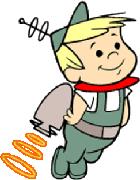
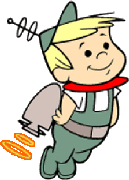
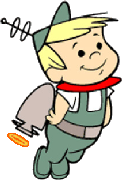
To create the illusion of your 2D game character flying you will need to fist create the character costumes. In this example, the character has been given a jet-pack so to create the illusion of a working jet-pack which is powering his flight a series of costumes, each with increasing power from the jet-pack were created to suggest a burst of fuel/power into the jet-pack. See below.


In this example, I will be using the 2D game engine Scratch (free to use) to programme the character but don't worry is you use a different game engine as the principles are  basically the same.

Firstly you will need to create to create 2 variables, 1 for the  characters speed on the x-axis and 1 for the characters speed on the y-axis. You can call them anything you want but ideally use something obvious such as "x speed" and "y speed". These variables can then be used in the programming code to create a realistic sense of gravity.

All the snippets of code below are explained in their captions and how they relate to the overall flying process.

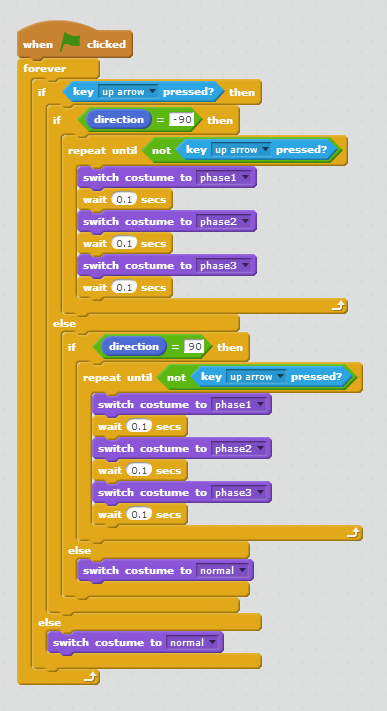
This code toggles through the costumes when the up arrow is pressed


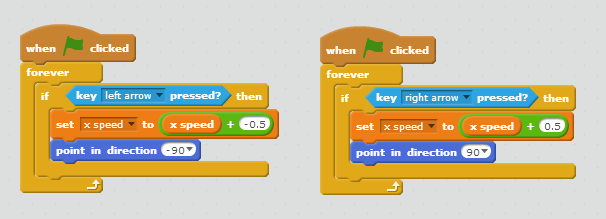
This code uses the x speed variable to speed/slow the character when the left or right arrows are pressed

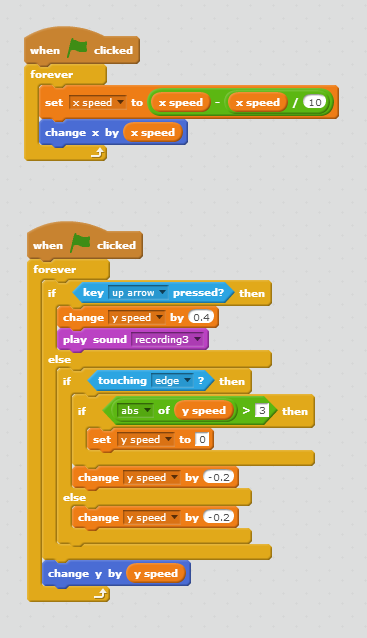
And finally the gravity creating code...

This code creates the illusion of gravity at the outset and then relates to it
 as the up arrow is pressed, representing the jet-pack being powered

Why not try it yourself, you can remix and edit the project here.

Sample Character For 2D Game

Click the green flag to start. Use arrows keys to make the character walk and jump.


This character was made and programmed using Scratch, but the principles are the same for most other 2D Game engines. See the code below to understand how the character movements are programmed.


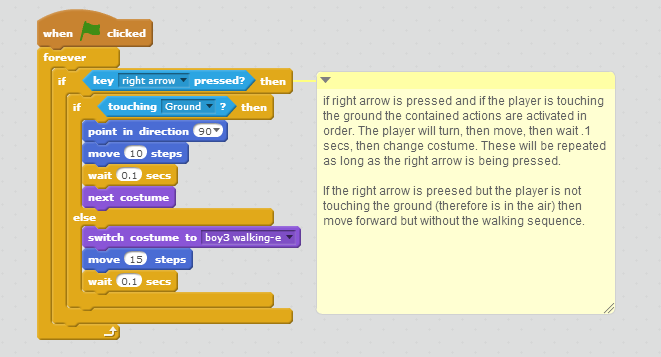
This code controls the right arrow key, the process is the same only opposite for the left arrow

This is the code for the up arrow

The costumes referenced in the above code examples are these character costumes...


Between the programming code and the character costumes a basic sense of a moving character can be created.


How To Create A Character Walk Cycle

In 2 Dimensional games and animations the illusion of motion is created by carefully sequencing slightly different still images at a speed quick enough, where the human eye will fill in the gaps between. This is usually 24 fps (frames per second).

Here's an example, the 5 images below are all still images, but when they are programmed to change quickly the character appears to walk, especially when a forward motion is added.


This is a basic sample (below) showing how character costumes can be created and arranged to simulate movement in a 2D game. Press the green flag to start.


The motion is created by this block of logical programming along with the character costumes shown above.

programming code for the sample animation above