Web Design Tips 2015

1.What's The Point?

What's the point of your website? That must be your first decision

Believe it or not there are only 3 types of websites - information, entertainment and transaction.
Information websites provide information- obvious example is Wikipedia
Entertainment website provide entertainment- obvious example is YouTube.
Transaction websites will either buy goods from you and/or sell goods to you - obvious example is eBay.

Every website falls into one or more of these categories. The first thing you need to decide before designing your website is what is  its purpose? Secondly who is it aimed at? Once you have made those decisions you can more easily design your website to meet the demands associated with that website category and that target audience.

2. Mobile Is Bigger Than Desktop*

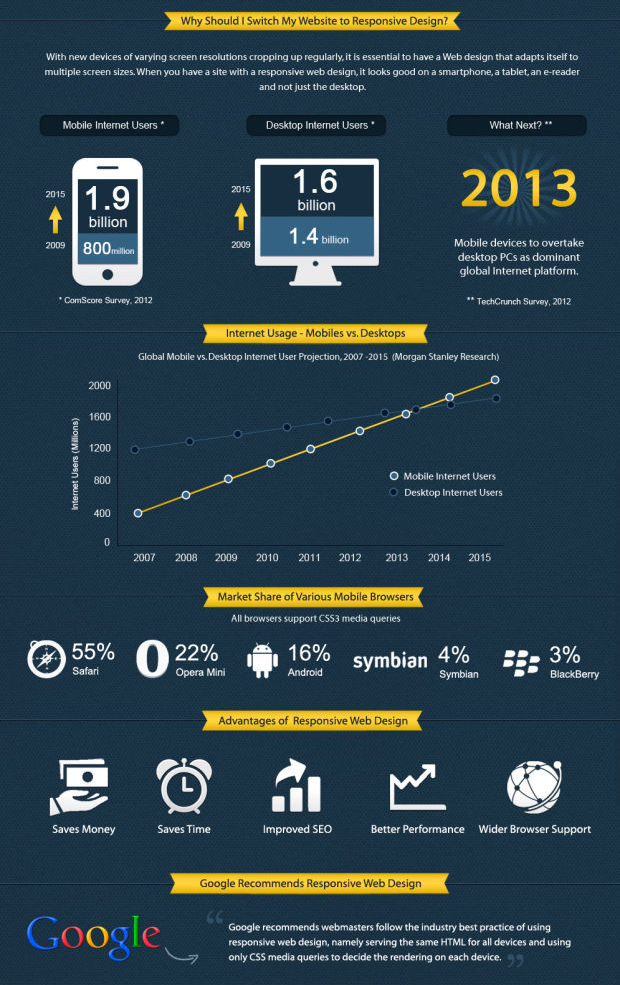
Internet usage is now greatest on mobile device

It goes without saying nowadays that your website should be responsive but I have found that people tend to create the desktop design and then use media queries to work down to tablet device design and finally mobile design. This is the wrong approach. Why?

*For the first time more people now access the internet using mobile devices than desktops or tablets so it makes sense to prioritise your websites mobile design then scale up using a fluid design and/or media queries.


3. Show The Way

An organised, obvious and functional menu is key to a successful website

Web navigation has many well established and functioning characteristics and you should not stray away from them,; there is no need to reinvent the wheel and if you try it will likely confuse your visitors and spoil their browsing experience. On the flip side, an effective navigation system encourages browsing within the website which can in turn increase revenue.

Your menu is obviously the main navigation device for your website and it should be immediately obvious when the webpage launches, ideally fixed at the top of the page with no surrounding elements to distract from it. This also makes the links easier to click on a mobile device. If the website's style allows it then perhaps add an additional (relevant) icon with each menu link, this creates an immediate association for the visitor with the purpose of the link.

Links within the body text should at least be a different colour than the body text and you should retain the default link underline as without it the links may just look like bold text. Ideally all links should have a hover effect added using CSS and a title attribute using HTML.


4. Nobody Reads

If nobody reads text any more then how do you get your message across

Let's face facts, nobody reads all the text on a website, in fact I don't even if anyone will read this sentence (leave a comment if you do!). What people do is scan the page for what they want, when they do this images, headings, sub-headings and links are what the notice (in that order).

With this knowledge in mind you should provide images and/or icons to go with all key links/points and break any large areas of text into sections, each with a heading and possibly sub headings also like I have tried to do with this article. As a general rule in terms of website text, just get to the point.


5. Optimise, Optimise, Optimise**

There are 3 key areas of your website to be optimised

**I wasn't repeating the word optimise for fun or even for emphasis. I actually want to advise that you optimise 3 keys areas of your website- the layout, the loading speed and the content.

The layout optimisation should focus on utilising one of the recognised web layout techniques such as the F layout or the Z layout. The purpose of which is to direct visitors to the outcome that you want such as clicking on a link, signing up to a newsletter or buying a product. An optimal layout will result in optimal outcomes.

The loading speed can be optimised by removing unnecessary content, minifying you HTML and CSS, keeping slow loading content below the fold, optimising images for web viewing etc. The Google page speed insights tool is a great help. Faster loading is not just appreciated by your visitors but also the search engines who now factor it into their indexing algorithms.

Optimising content is old news but remains an important activity which still makes lots of companies lots of money. The reality is that it is actually a relatively simple but highly tedious process, so if you got the time then you can save the money. Learn more about SEO here.

Top 5 Interior Design Tips

1. Start With Something Special

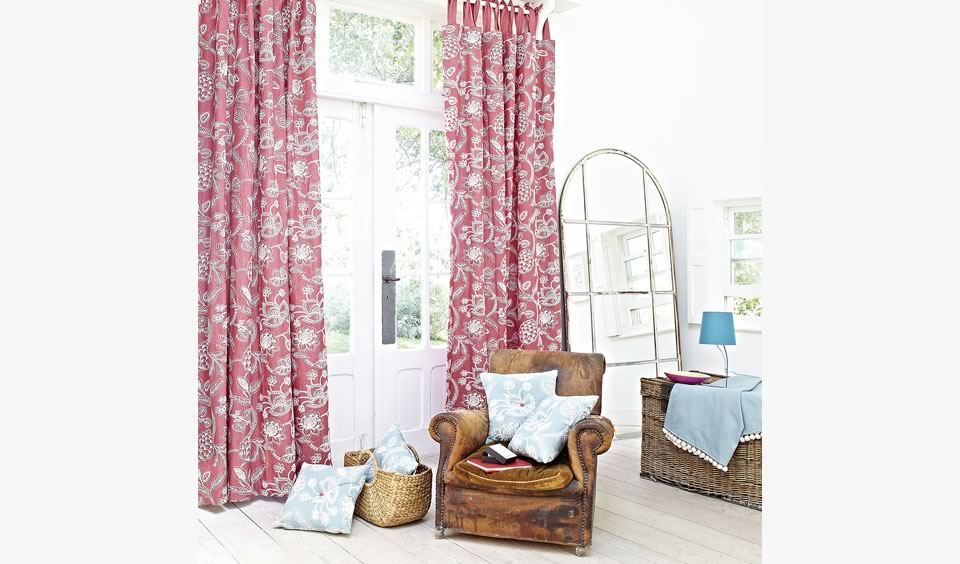
This room could have started with the blue lamp....
Start a project by picking just one item that you really like. That could be a anything from a fabric pattern , a piece of furniture, a cushion to a piece of art. The item doesn't need to be a feature piece it just gets you started.

Then let that item set the theme and style for the room and you'll find that the rest of your decisions will follow on from that. Easy!

2. Feature Something, But Not Everything

The artwork is left alone on the wall so it can be a feature, other art would only detract and distract from it

Don't try and make everything a feature. Let the real feature stand out, give it room to breath and be appreciated. 

Keep an open mind on what can be a feature. It could be anything from a fireplace to a painting or maybe an old fashioned chandelier.

3. Keep It Consistent

This room is consistent in terms of style and colour palette


Aim to maintain the one style throughout the room and preferably throughout the house, whether your chosen style is traditional, modern, contemporary or of a particular era. 

If you want an eclectic mix it is still possible but choose carefully, as it is a style that can look very disjointed and messy rather than stylish if there is not some connection between the items, whether that be colour, design era or materials (eg. natural).

4. Showrooms Are Big Places

Mark out the scale of the furniture you want in the space before you buy


Measure the space and the furniture before you buy

People often make the mistake of buying furniture in a showroom that then looks way too big when you get it home. Measure your interior space before you buy and ideally test the scale of the item you want in the place you want using sheets of newspaper to mark out floor area that will be covered. You can also bring in old chairs and cover them with sheets to get a feel for height. 

And don't automatically go for a suite, especially if you're limited for space. Consider a sofa and some individual chairs or recliners because the chairs that come in a suite are often huge.

5. Light Is Open, Dark is Cosy

Even though the room is bright the dark wall and fabrics help close in the space and make it feel more cosy

The white wall and light wood floors along with the large mirror make this small space feel open and spacious

There is a reason that show houses use magnolia and white on the interior walls. It's because light colours reflect more light and have the effect of making spaces feel larger so you'll pay more. Mirrors will also achieve the same effect.

There is also a reason that pubs and bars have darker colours on the walls and other surfaces as it has the effect of closing in the space and making it feel cosy, that way you'll feel more comfortable and stay longer

These simple but effective colour choices can also be utilised in your own spaces.

How To Be Creative

1. Create the Right Environment

Every single individual can be creative, you simply require the right environment, stimulus, and support. Children are full of creative energy  in part because they have not yet learned to fear the criticism of their peers or experienced embarrassment from failure. This is why firms like Google go to great lengths to provide employees with a workplace resembling an adult playground. The goal is to create an environment that lets employees feel comfortable with vocalizing creative, even wacky, ideas.

Businesses that value creativity need to do their best to foster a creative, safe space where unusual ideas are celebrated and where creativity is nurtured. Though not all creative ventures will work out, ultimately some will. So try to work in bright, light spaces with plenty of fun, playful toys and "distractions" around to keep your inner child happy.


2. Doodle and Sketch

Two tips here really but they are in the same area so I've combined them into the one.

Doodling, contrary to popular opinion, does not demonstrate a lack of focus. In fact, doodling can enhance recall and activate unique neurological pathways, leading to new insights and cognitive breakthroughs.  So when your in a creative rut, just relax your mind and let the pen loose. 

Always keep a sketchbook handy and have a deskpad at your workstation so you always have a surface to draw on when an idea hits or when trying to eek one out. Don’t over analyse your results just draw to get an idea out of your head and out into the world so it isn't forgotten or dismissed by your mind before it's given a chance.


3. Try New Things

Creativity flourishes when you put yourself outside of your comfort zone and try something new. So try painting, pottery, or woodworking, learning a new language, picking up a new instrument, or taking a class. Anything really, as long as it's new - even a new method of doing what you always do, just in a different way. It may give you a new perspective on things.


4. Try the 30 Circles Test

This creative exercise comes from researcher Bob McKim,

Take a piece of paper and draw 30 circles on the paper. Now, in one minute, adapt as many circles as you can into objects. For example, one circle could become a sun. Another could become a globe. Try to create as many as you can in one minute.

It's unlikely you'll get to 30, largely because we have a tendency as adults to self-edit. Kids are great at simply exploring possibilities without being self-critical, whereas adults have a harder time. Sometimes, even the desire to be original can be a form of self-editing.


5.Visualize

One of the best ways to help your creative process along is visualizing what you are trying to achieve. If you don't at least have an idea in your mind of what you are trying to achieve then you are unlikely to know when you are finished or even if you are making progress.

Simply close your eyes and create a mental image of what you are doing and how you want it to progress. See yourself being successful and creative and you will be.


And if my top 5 tips for being creative are not enough then perhaps the infographic below will be.
I'm not sure where I found this wonderful infographic but thought I'd share it anyway as I have found it a very useful reference when the dreaded creative block rears it's ugly head. If you do know where it came from then let me know through the comments as I'd love to give them credit.


What Is Responsive Web Design (RWD)

What is responsive web design

At this point you have probably already heard about responsive web design or RWD and how every website needs to be responsive to work well and look good across multiple devices. If so, you heard right!

As shown in the graphic above, CSS3 is the final piece in the responsive puzzle. By specifying multiple CSS3 @media queries, you can write different CSS code for different screen sizes, different devices and even different device orientations (landscape or portrait).

By inserting the relevant CSS code in each section you can have elements of your web page resize, move or disappear according to the screen size or device orientation of your user. Responsive web design is vital for any web project and CSS media queries are vital for a successful responsive website. 

So to make things a little easier for you here are all the main CSS media queries need for a responsive website.

CSS Media Queries For a Responsive Website


/*Responsive Styles*/


/* Smartphones (portrait) ---------------- */
@media only screen
and (max-width : 320px)
{
/* Add Your CSS Styling Here */
}

/* Smartphones (landscape) ---------------- */
@media only screen
and (min-width : 321px)
and (max-width : 767px)
{
/* Add Your CSS Styling Here */
}

/* Tablets (portrait) -------------------- */
@media only screen
and (min-device-width : 768px)
and (max-device-width : 1024px)
and (orientation : portrait)
{
/* Add Your CSS Styling Here */
}


/* Tablets (landscape) ------------------- */
@media only screen
and (min-device-width : 768px)
and (max-device-width : 1024px)
and (orientation : landscape)
{
/* Add Your CSS Styling Here */
}

/* Old Desktops and laptops ------------------ */
@media only screen
and (min-width : 1025px)
{
/* Add Your CSS Styling Here */
}

/* Desktops ------------------ */
@media only screen
and (min-width : 1201px)
{
/* Add Your CSS Styling Here */
}


Do You Need A Responsive Website...?


Layered Image Effect Using CSS

This Article outlines a simple but impressive CSS effect for you to use on your website.

The effect...


The HTML


The CSS

div.box1
{
z-index:1;
position:relative;
-webkit-transform: rotate(-3deg);
-ms-transform: rotate(-3deg);
-o-transform: rotate(-3deg);
transform: rotate(-3deg);
}

div.box2
{
z-index:2;
position:relative;
left:-150px;
}

div.box3
{
z-index:3;
position:relative;
left:-350px;
-webkit-transform: rotate(3deg);
-ms-transform: rotate(3deg);
-o-transform: rotate(3deg);
transform: rotate(3deg);
}

Top 10 SEO Tips


The role of the SEO (Search Engine Optimisation) Specialist is to optimise a website to make them as visible as possible to Internet search engines, in order to increase their rankings and maximise traffic to them. Search engines, especially Google, are very reluctant to reveal how their algorithms work so it is impossible to specify exactly how to optimise a website perfectly, however there are still some tools and techniques which are known to improve a website's visibility to search engines. It is these tools and techniques that are discussed here.


1 - Web Page Names:


As well as the obvious choice of the name of the website itself it is also important to consider how you name each individual web page. The name of the web page is the secong thing a search engine will read, after the website name itself, so it is an important opportunity to include keywords and describe what content is on the page. When designing a website page names are usually saved as all one word, for example 'web design' becomes 'webdesign', as it is quicker to type and easier to remember. You may consider instead saving it as web-design or web_design as it allows search engines to identify the two seperate words, which are both keywords, instead of not recognising the singular word 'webdesign'. Also avoid using abbreviations for page names, for the same reason.


2 - Web Page Titles:


The title of a web page is written in the HTML code in the head section of the page and appears in the top of the browser window or in the tab of newer browsers. See a sample code and it's result below.

The title of a web page is extremely important as is showcased by the fact that it is the first and largest thing in the google search results. See the example below, the title is in blue.


3 - Article Headings and Sub Headings:


Headings, created with the 'h1', 'h2', 'h3', elements are important for highlighting these Keywords. As they are headings and not just body text they are seen as being more important for describing, in short, the content that will follow. Therefore try to integrate relevant headings into the content of your website for better SEO but also for another reason.

In today's fast paced world people don't really read articles or webpages, they skim through them to try to quickly find the content they are looking for. By using headings and sub headings in your webpages you are breaking up any long, boring looking passages of text into smaller, more manageable chunks and helping your visitors with this process and they are therefore more likely to find the content they need and stay on your website longer. This will help with your pages bounce rate.


4 - Keywords and Description:


When someone uses a search engine they normally don't type full sentences like 'I am looking for information on design' , they usually just type in 'design' or 'design information', in this case 'design' and 'information' are the keywords. It is important that your website contains the key words relative to it. This used to be done using meta tags, some search engines still use meta tags, but due to the practice of keyword 'stuffing' (repeating key words over and over) search results were beginning to become unreliable as the best/ most relevant pages were not necessarily making it to the top of the rankings. Google admits it no longer uses meta tag keywords, although it still does use the meta tag descriptions and the description usually appears as the sentence below the website title (in blue) and address (in green)in the search results. See the example below,


The code for meta tag keywords and descriptions goes in the head section of the HTML code, as it is information about the page but it does not appear on the page itself (otherwise it would go in the body section). To see an example of meta tag code see the example below,


Although meta tags are useful, it is much more important to include the keywords, that you think potential visitors will be searching under and which match the content of your website, in the website content itself. Despite all the tools, techniques and tricks associated with SEO it still all comes down to the quality of content in the website, content is king! So be sure to tweak the body text to include as many keywords or keyword synonyms as possible, without of course, ruining the content itself. The quality of the content must reamin high as even if you get to number 1 in the search engine rankings when visitors come and don't find the information they are looking for they will leave the site just as quickly as they arrived!


5 - Web Links:


Links, in two senses, can help a website's ranking in search engine results. Firstly, by linking your website with other websites and getting them to link back to you, you are enhancing your website's online reputation and demonstrating that it is a trustworthy and safe website for visitors. Search engines regard trust and safety highly as they do not wish to lead searchers to an unsafe or virus filled website.

Secondly, the links within your website are another opportunity to include keywords in the content. As links are 'marked up' in a different way to normal body text it is only logical to presume that search engines will read it in a different way to standard body text. The clickable content of the link and the link title (which should be included on every link) should be descriptive enough to let the website visitor find the information they need which in turn keeps the visitor on your website for longer and increases the sites traffic statistics while also reducing the 'bounce rate'. The 'bounce rate', according to Google Analytics, is 'the percentage of single-page visits (i.e. visits in which the person left your site from the entrance page). Bounce Rate is a measure of visit quality and a high Bounce Rate generally indicates that site entrance (landing) pages aren't relevant to your visitors. By having clear and obvious links, especially in the menu section, visitors are more likely to stay on your website and search for the information they need.


6 - Images:


With the evolution of search engines people can now search directly for images or videos without having to go through the site on which they are hosted. Despite this, search engine haven't evolved to the point where they can directly extract the meaning from a photo or a video. Therefore search engines are still reliant on the information we provide them through names, alt attributes, title attributes, headings, surrounding context, and so on.

The simplest thing you can do to increase the meaning of 'img' elements is to use proper file names. For example, let's say we have a web page about web design and I took a photo of someone sitting at their computer that I then wanted to post up on the page. Cameras will auto-generate a file name to my photo, such as DIM1234.jpg, so it is important to rename it to something that specifies the content of the image such as web-designer-at work.jpg. Now the URL of the image will be something like http://example.com/web-designer-at-work.jpg. The image now has a better chance of being indexed for terms such as 'web design' and 'designer at work'. The image may eventually rank in the results for Google Images and drive traffic to your website.

The second aspect involved in optimizing images for SEO is placing important keywords in the image's alt and title attributes. Here's another example,

<img alt= "web designer at work.jpg" title="web designer at work" src="web-designer-at work.jpg">

The alt attribute is typically regarded as the primary attribute of an image that a search engine will use for gaining context. But don't stuff keywords in them, write your alt attributes primarily for your visitors. Search engines view alt attribute keyword 'stuffing' as a bad practice and may remove your image from search results.


7 - Videos:

Much like images, videos can't be crawled by their content. However, there are metadata that you can include to help search engines understand what the video is about. The main thing to optimize is the title of the video, especially when you're using a third party streaming service such as YouTube or Vimeo. Secondly, add keyword tags to videos when uploading them to YouTube and Vimeo which they use in their site search. Another element that affects the search results of a video is the video's description. The description is an opportunity to include the keywords that you wish the video to be found under, without 'stuffing' of course. A good description will go a long way to increasing the videos ranking in search engine results.

Another way to increase ranking in the search results for videos is to get as many views, Facebook Likes and +1's on your video as possible. This is based on the logical assumption that search engine algorithms take social sites into account as a ranking factor. If your video gets a substantial amount of Facebook Likes compared to other videos in the same category, there is a higher chance it will rank better for your targeted keywords.

So SEO for images and videos takes little time to implement and can provide significant results, especially in niche markets. For example, when you're having trouble getting a page or article to rank for a competitive keyword in your niche, posting an optimized video or image may help you get a leg up. At this time, search engines can't index the actual content of an image or a video, but we can provide them with greater meaning and context using the simple and practical techniques we have discussed.


8 - Page Load Speed:

The page loading speed of your website is now believed to have an effect on how Google ranks it in it's listings. A faster loading website is immediately more user friendly and with studies showing users will click out of a website if a webpage is not at least partially loaded after 3 seconds then having a website optimised for speed is a must.

Google provides an excellent resource to test the speed of your webpages, in desktop and mobile terms, and then outlines possible improvemnts with links to articles on how to go about it. This very useful resource is referred to as the Google Page Speed Insights and can be found here.

Images, videos, ads and any widgets will always be the main culprits for sling down a webpage so don't rush to delete valuable content, just optimise what is there.


9 - Mobile Friendliness:

A noticeable feature on the Google page speed insights results which also appears on Google AdSense and Analytics account pages is a reference to mobile friendlines. It may appear under different names such as user experience or site responsiveness or mobile compatability but the point remains the same; Google values how mobile friendly a website is. In each of these cases you will get a rating or score for your website and a link or links to articles'tutorials on how to improve it. Why is this relative for SEO you ask; because if Google are going to the effort of encouraging you to improve it and assisting you in doing so then you can be sure they are factoring it into their seach algorithm.

As with the page speed, you should not go deleting valuable content or spoiling your websites design just to achieve a better score but a few small tweaks or removal of secondary content when an article is being viewed on a mobile device should be considered. Page load speed is a major factor in mobile friendliness but don't forget font sizes, spaced links (tap targets) and a clean simple layout.


10 - Create a Google Account:

A google account allows SEO Specialists to utilise their online tools, such as googles webmaster, analytics or web optimiser tools. As well as these extensive tools, the simple but vital act of submitting a website to be included in the Google rankings can only be done if you have a Google account.

Having these tools at your disposal is one thing but it is vital that you utilise them effectively and use them often. SEO techniques change frequently, so a large part of the SEO Specialist's job involves research, self-study and reading in order to stay up to date with developments in the industry. Thereafter you will be responsible for analysing the website statistics that these tools provide in order to monitor the effectiveness of the website and make adjustments as necessary.

Back to Top