Colour Theory

If you understand the theory of colours you are better placed to choose the right colour for the right job
When presenting a design or an idea your choice of colours is very important. Many surveys have been carried out on the general public to find out what people like. The findings suggest that very young children like bright, vibrant colours (reds, yellows and oranges etc...) whilst older people like more gentle or sophisticated colours and tones such as shades of blue. It is very important for a designer to understand the way colours are put together/created as this may help in the selection of the right colour scheme for a particular age group. Next time you pass a poster look closely at the colours - the designer has considered them very carefully.

The Colour Wheel

Primary Colours: 

These are colours that cannot be created through the mixing of other colours. They are colours in their own right.

The three primary colours are RED - YELLOW - BLUE.

Primary colours can be mixed together to produce SECONDARY COLOURS. 

Secondary Colours:

The table below shows the combination required to produce secondary colours.

YELLOW + BLUE = GREEN
BLUE + RED = PURPLE
RED + YELLOW = ORANGE

The colour wheel can be seen above and this can be used to help remember primary and secondary colours. The secondary colours are in between the primary colours - for example - between red and blue is purple. Quite simply, mixing the primary colours of red and blue paint together will produce the secondary colour purple.

An important rule of the colour wheel is that colours opposite to each other on the colour wheel usually work well together as a colour scheme. These are known as COMPLEMENTARY COLOURS. Complimentary colours are often used together in graphic design as they tend to give the image/graphic a sense of balance and are visually more aesthetic.


Colours, Feelings, Emotions & Atmosphere:

Designers have a large range of colours at their disposal and most are well aware that certain colours are associated with feelings and emotions. The diagram below show a number of popular colours and the feelings/emotions to which they are associated. Designers, companies and manufacturers use colours cleverly to promote a certain feeling about their products.

Colour Associations

Colours also have an effect on your visitors before they begin to read the content of your web site or printed design. Thus, it is very important for you to consider your target audience, the psychology of color, and the corporate image you wish to project BEFORE you complete your design.

When colour is used correctly, it can add impact and clarity to your message and highlight important points. Alternatively When colour is used incorrectly, it can compromise your message and confuse your target audience.

Colour can work for your web site and printed materials in various ways:
  • Colour emphasizes, highlights, and leads the eye to important points or links.
  • Colour identifies recurring themes (i.e. titles and subtitles are usually the same colours).
  • Conversely, colour can differentiate, such as different colours in pie charts and bar graphs.
  • Colour symbolizes and triggers emotions and associations.

The interpretation of a colour depends on culture, profession, and personal preference. In general, the colours red, orange, and yellow are "exciting" colours and the colors purple, blue, and green are "calming" colours.

Interpretation of colour is not always a matter of personal preference. For example, in Western cultures the colour white symbolizes purity; however, in China the colour white symbolizes death.

To summarise, it is very important to consider your target audience, the psychology of colour, and the image you wish to project before you construct your web-site, printed materials, and logo.

For information on creating your own colour scheme for a design project see the colour schemes section.


16 Simple Design Presentation Tips

Sample Presentation Board

When presenting a single design or an entire design portfolio there are certain tips and techniques that you should consider. If you are creating a presentation board for an interior design project, visit our extended article specifically dedicated to Interior Design Presentation boards. When presenting a design concept board information contained within the presentation drawings can be supplemented by accompanying text. This text is another important element in the design of a graphic presentation. The display of text needs to be considered, it might be boxed out or weaved into the actual drawings. In terms of the general layout of a presentation board consider these tips.

General Presentation Tips:

  • A good presentation should not be cluttered, it needs to have sufficient space to allow the information to be easily read and absorbed.
  • The information may be rendered in varying sizes or using different graphic styles and techniques.
  • The content should align purposefully as this will help the viewer read the individual elements as a collective set.
  • The graphic presentation style you choose should complement the design idea being conveyed and of course the presentation should clearly communicate the designers idea, concept and intention.
  • Overall keep it clear and simple.
  •  Remember that any text is supplementary; the drawings should remain the primary means of communication and the focal point of the presentation.

When planning a design presentation portfolio needs careful consideration and organisation, but using a storyboard framework can help you organise the content of your portfolio of work. Before you begin follow these steps...

Portfolio Presentation Tips:

  • Determine the audience for your presentation. What will they want to see?
  • Write an outline or brief for your presentation
  • Draw up a sequenced list of content for you presentation
  • Consider the best format and layout of the sheet(s)
  • Choose a font style and size that will compliment your images. Remember you will need to use the font consistently throughout
  • Consider the distinct, separate sections of your presentation
  • For concept boards, denote the creative journey of your presentation. Indicate in words and sketches the sequence of the project and the specific images associated with it
  • For multiple page projects, label each page according to the sequenced list of contents you compiled earlier.
  • Consider how the content connects to one another. Edit and revise where necessary until you are happy with the narrative
  • Once happy with everything, assemble your portfolio so it corresponds with the flatplan.

Design Elements

Understanding the elements of design makes it easier to put these pieces together in the most visually interesting and effective way.

Design Elements refer to the different types/categories of parts that can be used in the creation of any given composition. These elements can be combined and arranged in a variety of ways to create an endless variety of designs, both two and three dimensional. They may seem like obvious categorisations but understanding them is important to enhancing your ability to utilise them in your design projects. You should ideally follow up this article by reading about the Design Principles.

Understanding design elements is key to creating professional designs that are both simple and stylish. Using the design elements correctly allows you to keep designs clear and minimal without looking plain or boring; it's a fine line but it is along that line that the best designs rest. Here the elements are outlined and explained, but how you use them is dependent of the principles of design that you choose to use. So it is recommended that you follow up these notes by looking at the principles of design.


Point:

A point is a single dot or mark that has position but is otherwise limited. It is a single entity in itself and alone it can act as a focal point or a stopping point in a composition. For example a target or dart board has a single point as its focus. Together a number of points can have a leading effect where the eye naturally attempts to "connect the dots" to create a line or form. This is known as the Gestalt grouping principle.


design element - point 

Line:

A line is essentially a series of connected points. There are characterised by their length, direction and weight. Lines can be straight or wavy, long or short, heavy or soft, architectural or organic. As such they can be utilised in a variety of ways in a composition. They can be used to create perspective, outline a landscape, frame a composition etc.


Form/ Shape:

Shapes are essentially closed lines. Shapes can be two dimensional or three dimensional. The basic two dimensional shapes are squares, rectangles and triangles with the related three dimensional shapes being cubes, bricks (technical name is a rectangular prism) and pyramids. An infinite amount of other shapes exist of course, whether they are fluid organic shapes or rigid abstract shapes.


Texture:

Texture is the appearance of a surface material. The main differentiation between textures is that it is either rough or smooth. Textures suggest what a form/shape is made of and can be created using points, line, shapes or colour. Unlike the other elements, texture is both a visual and tactile element.


Colour:

Colour is how the eye perceives reflected light. There are many different theories about colour which are covered in more depth in the section on colour theory. What I will explain here are the three main components of colour: hue, value and saturation.


Colour properties

  • Hue is where a colour is positioned on the colour wheel.
  • Value is the darkness or lightness of a colour.
  • Saturation is the intensity of a colour.

Space:

Believe it or but in a design what you don't add can be just as important as what you do. What i'm talking about is empty space. Space is mainly used to frame an item or object in a composition. By leaving space around something the viewer is better able to isolate and concentrate on it without the distraction of any other overlapping or intersecting objects.

space around items allows them to be 'read' more easily

Design Principles

It is recommended that you read the notes on Design Elements before reading these notes as some of the terms used here are explained in that section.

There are 5 basic concepts or theories in the area of design, collectively known as the principles of design; they are Balance (Alignment), Rhythm (Repetition), Proportion (Proximity), Dominance (Contrast) and Unity. Theses principles are sometimes know by different names hence the brackets.They represent the basic rules of how to arrange a composition and create a successful design. In order words they guide us in the way we arrange the elements of design. Sometimes we look at an image or object and we find it aesthetically pleasing or easy on the eye but we may not quite understand why. The reason is that one or more of the principles of design are at work.

Balance/ Alignment:

Balance refers to the arrangements of design elements within a composition, how they relate to each other and the overall composition. Elements can have different visual weights dependent on their size, shape or colour and if positioned poorly they can unbalance a composition. There are two types of balance - symmetrical and asymmetrical.

Symmetrical balance

Symmetrical balance is where the weight of a composition is evenly distributed either side of the centre point of the composition, usually horizontally or vertically (although radial symmetry is also possible).

Asymmetrical balance

Asymmetrical balance is where the weight of a composition is not equally distributed (but is still visually balanced). This is much harder to judge than symmetrical balance but can be more visually interesting.


Rhythm/ Repetition:

Rhythm can create a sense of movement in a composition by repeating or alternating elements (often but not always in a pattern). There are 3 main types of rhythm, each defined by their suggested meaning or the feeling they evoke in the viewer.

Progressive Rhythm

Progressive rhythm shows a progression of lines or forms to create a sense of moving forward or up.

Flowing Rhythm

Flowing rhythm implies a more natural sense of movement in a composition through the use or wavy lines or fluid forms usually or unequal size and length.


Regular Rhythm

Regular rhythm is where the elements used are of the same or similar size, length and weight and are positioned in a pattern (usually but not always).


Proportion/ Proximity:

Proportion is simply the comparative size of elements (usually shapes) relative to each other or the overall composition. Proportion can be used in a composition to create a sense of distance or demonstrate a size difference. Proportion can also be used to create or unhinge the balance in a composition as their visual size and weight will automatically establish themselves in the composition.


Dominance/Contrast:

Dominance may seem similar to proportion but is actually more to do with the visual weight of an element. The dominant part of a composition is the one that stands out the most or appears closest to you. There are 3 stages of dominance: dominant, sub-dominant and subordinate.


This images has levels of dominance

Dominant is the primary object/area, the one with the most visual weight, usually appearing in the foreground.

Sub-dominant refers to the secondary object/area, usually found in the middle ground of the composition.

Subordinate objects/areas carry little visual weight and usually appear to recede into the background of the composition.

Unity:

Unity refers to the relationship or connection between the various parts within a composition and their relationship or connection to the composition as a whole, it is often achieved by utilising a number of the aforementioned principles. Unity can give a sense of entirety or wholeness to the composition or equally break it up and create a sense of variety or disharmony. An image with good unity will draw the viewer in and focus them around the one area or a few connected areas and generally get the point across very quickly, so are therefore ideal for advertising. Images/compositions without unity can be difficult to read or visually awkward.

This image has Unity and Rhythm


Web Design Tips 2015

1.What's The Point?

What's the point of your website? That must be your first decision

Believe it or not there are only 3 types of websites - information, entertainment and transaction.
Information websites provide information- obvious example is Wikipedia
Entertainment website provide entertainment- obvious example is YouTube.
Transaction websites will either buy goods from you and/or sell goods to you - obvious example is eBay.

Every website falls into one or more of these categories. The first thing you need to decide before designing your website is what is  its purpose? Secondly who is it aimed at? Once you have made those decisions you can more easily design your website to meet the demands associated with that website category and that target audience.

2. Mobile Is Bigger Than Desktop*

Internet usage is now greatest on mobile device

It goes without saying nowadays that your website should be responsive but I have found that people tend to create the desktop design and then use media queries to work down to tablet device design and finally mobile design. This is the wrong approach. Why?

*For the first time more people now access the internet using mobile devices than desktops or tablets so it makes sense to prioritise your websites mobile design then scale up using a fluid design and/or media queries.


3. Show The Way

An organised, obvious and functional menu is key to a successful website

Web navigation has many well established and functioning characteristics and you should not stray away from them,; there is no need to reinvent the wheel and if you try it will likely confuse your visitors and spoil their browsing experience. On the flip side, an effective navigation system encourages browsing within the website which can in turn increase revenue.

Your menu is obviously the main navigation device for your website and it should be immediately obvious when the webpage launches, ideally fixed at the top of the page with no surrounding elements to distract from it. This also makes the links easier to click on a mobile device. If the website's style allows it then perhaps add an additional (relevant) icon with each menu link, this creates an immediate association for the visitor with the purpose of the link.

Links within the body text should at least be a different colour than the body text and you should retain the default link underline as without it the links may just look like bold text. Ideally all links should have a hover effect added using CSS and a title attribute using HTML.


4. Nobody Reads

If nobody reads text any more then how do you get your message across

Let's face facts, nobody reads all the text on a website, in fact I don't even if anyone will read this sentence (leave a comment if you do!). What people do is scan the page for what they want, when they do this images, headings, sub-headings and links are what the notice (in that order).

With this knowledge in mind you should provide images and/or icons to go with all key links/points and break any large areas of text into sections, each with a heading and possibly sub headings also like I have tried to do with this article. As a general rule in terms of website text, just get to the point.


5. Optimise, Optimise, Optimise**

There are 3 key areas of your website to be optimised

**I wasn't repeating the word optimise for fun or even for emphasis. I actually want to advise that you optimise 3 keys areas of your website- the layout, the loading speed and the content.

The layout optimisation should focus on utilising one of the recognised web layout techniques such as the F layout or the Z layout. The purpose of which is to direct visitors to the outcome that you want such as clicking on a link, signing up to a newsletter or buying a product. An optimal layout will result in optimal outcomes.

The loading speed can be optimised by removing unnecessary content, minifying you HTML and CSS, keeping slow loading content below the fold, optimising images for web viewing etc. The Google page speed insights tool is a great help. Faster loading is not just appreciated by your visitors but also the search engines who now factor it into their indexing algorithms.

Optimising content is old news but remains an important activity which still makes lots of companies lots of money. The reality is that it is actually a relatively simple but highly tedious process, so if you got the time then you can save the money. Learn more about SEO here.

Top 5 Interior Design Tips

1. Start With Something Special

This room could have started with the blue lamp....
Start a project by picking just one item that you really like. That could be a anything from a fabric pattern , a piece of furniture, a cushion to a piece of art. The item doesn't need to be a feature piece it just gets you started.

Then let that item set the theme and style for the room and you'll find that the rest of your decisions will follow on from that. Easy!

2. Feature Something, But Not Everything

The artwork is left alone on the wall so it can be a feature, other art would only detract and distract from it

Don't try and make everything a feature. Let the real feature stand out, give it room to breath and be appreciated. 

Keep an open mind on what can be a feature. It could be anything from a fireplace to a painting or maybe an old fashioned chandelier.

3. Keep It Consistent

This room is consistent in terms of style and colour palette


Aim to maintain the one style throughout the room and preferably throughout the house, whether your chosen style is traditional, modern, contemporary or of a particular era. 

If you want an eclectic mix it is still possible but choose carefully, as it is a style that can look very disjointed and messy rather than stylish if there is not some connection between the items, whether that be colour, design era or materials (eg. natural).

4. Showrooms Are Big Places

Mark out the scale of the furniture you want in the space before you buy


Measure the space and the furniture before you buy

People often make the mistake of buying furniture in a showroom that then looks way too big when you get it home. Measure your interior space before you buy and ideally test the scale of the item you want in the place you want using sheets of newspaper to mark out floor area that will be covered. You can also bring in old chairs and cover them with sheets to get a feel for height. 

And don't automatically go for a suite, especially if you're limited for space. Consider a sofa and some individual chairs or recliners because the chairs that come in a suite are often huge.

5. Light Is Open, Dark is Cosy

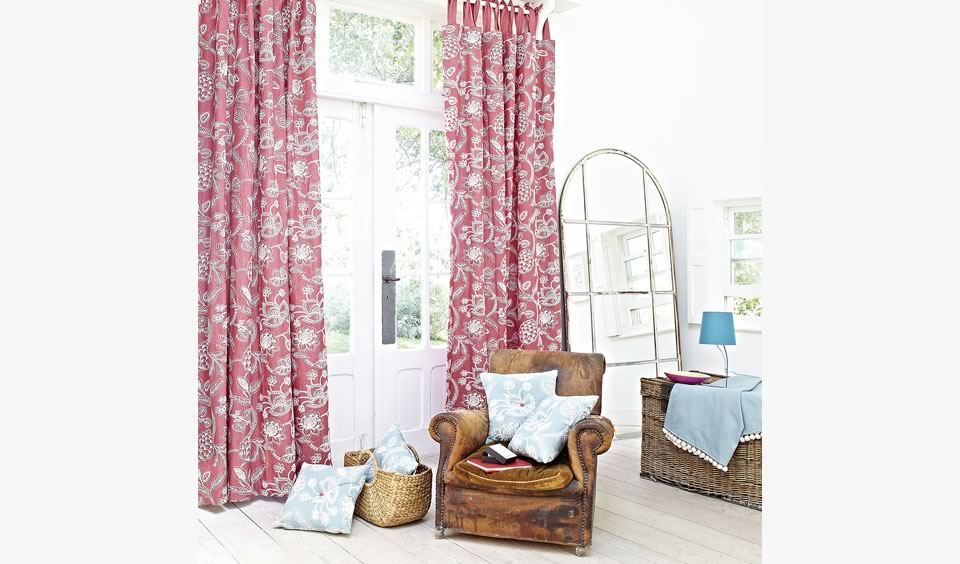
Even though the room is bright the dark wall and fabrics help close in the space and make it feel more cosy

The white wall and light wood floors along with the large mirror make this small space feel open and spacious

There is a reason that show houses use magnolia and white on the interior walls. It's because light colours reflect more light and have the effect of making spaces feel larger so you'll pay more. Mirrors will also achieve the same effect.

There is also a reason that pubs and bars have darker colours on the walls and other surfaces as it has the effect of closing in the space and making it feel cosy, that way you'll feel more comfortable and stay longer

These simple but effective colour choices can also be utilised in your own spaces.